
MLM e-commerce software that turns every order into volume
Products move a direct selling business, so the shop cannot be an afterthought. MLM.ERP connects your catalogue, distributor and retail checkout, replicated websites and repeat orders directly to the commission engine, so every sale is credited to the right sponsor, invoiced correctly and reflected in the genealogy instantly.
What is MLM e-commerce software?
MLM e-commerce software is an online shop built into a direct selling platform. Each product carries business volume or point value, every order is linked to a distributor or their referred customer, and commissions are calculated automatically from those sales. It typically includes replicated websites, repeat ordering, stockist panels, tax invoices and payment gateways in one connected system.
Sell to distributors and retail customers alike
A healthy direct selling business serves customers as well as members. Give both a smooth path from browsing to delivery.
Structured product catalogue
Organise products by category with images, descriptions, member and retail prices, and BV or PV values.
Member and retail checkout
Distributors buy at member prices while retail customers check out at retail prices, both credited to the sponsor.
Over 20 payment integrations
Accept UPI, Razorpay, PayU, Cashfree, Paytm, CCAvenue, Stripe, PayPal and crypto options such as USDT.
GST-ready invoices
Every order generates a tax invoice with the correct GST breakdown, ready for accounts and customers.
Help every distributor run a shop of their own
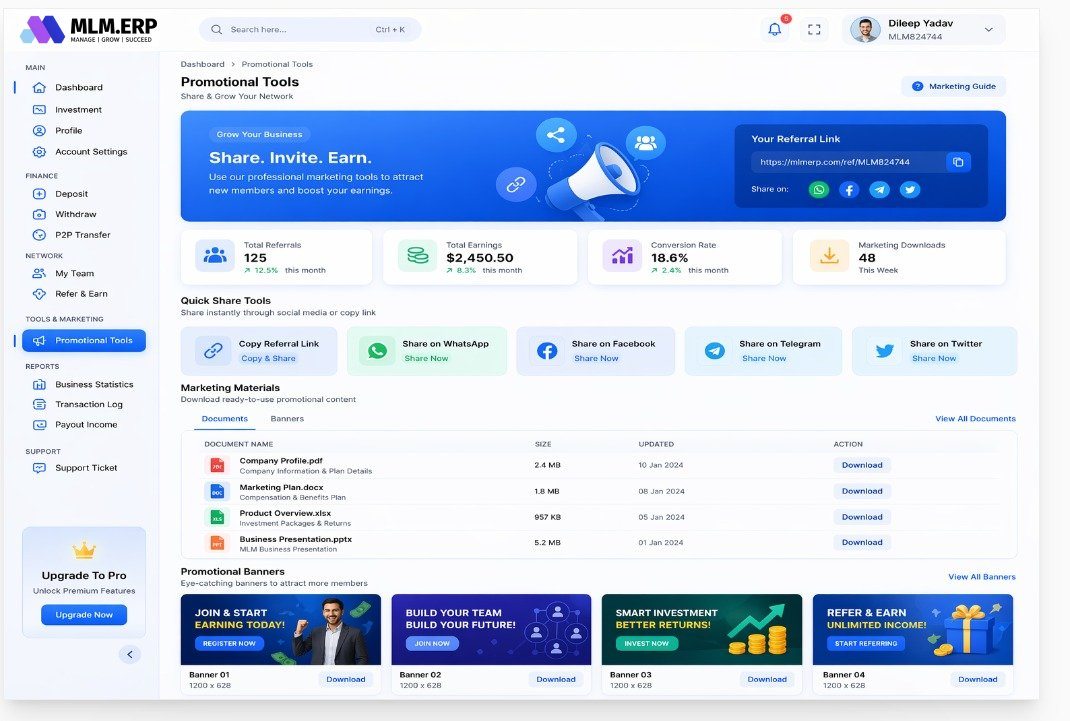
Distributors sell more when sharing is easy. Give them branded pages and content without asking them to build anything.
Replicated referral websites
Each distributor gets a personal storefront link; visitors who join or buy are credited to that sponsor automatically.
Promotional toolkit
Referral links, one-tap social sharing and downloadable marketing material keep messaging on-brand and compliant.
Shop inside the app
White-label Android and iOS apps let distributors and customers order on the go.
E-pins for offline sales
Generate and transfer e-pins for activations or product packages where cash or offline sales are common.
Keep volume flowing month after month
Retention drives direct selling. Repeat orders and local fulfilment points make reordering effortless for distributors and customers.
Repurchase and autoship
Distributors schedule regular orders that keep personal volume steady and support monthly rank qualifications.
Franchise and stockist panels
Regional franchises and stockists manage stock, take orders and earn their own commission on local sales.
Wallet checkout
Members can pay for orders from their e-wallet balance, subject to rules you control.
Instant commission credit
Each paid order triggers commission calculation in real time, so uplines see earnings as soon as sales happen.
Setting up your MLM shop
-
1
Load the catalogue
Import products with prices, BV or PV, tax rates and images, grouped into categories.
-
2
Connect payments
Activate the gateways and wallet payment rules that match your markets and customer habits.
-
3
Switch on replicated sites
Enable personal storefront links and promotional tools so distributors can start sharing straight away.
-
4
Configure repeat orders
Define repurchase products, autoship schedules and how repeat volume feeds monthly qualifications.
-
5
Add fulfilment partners
Onboard franchises and stockists with their own panels, stock records and commission rules.
What to look for in MLM e-commerce software
Use this list when you compare vendors. Ask each one to show you, not just tell you.
See MLM.ERP tick every box- BV or PV set per product, with separate member and retail prices.
- Replicated websites that reliably credit retail and member orders to the referring distributor.
- Repeat ordering or autoship options that support monthly activity and rank rules.
- Tax invoices generated automatically, including GST for Indian orders.
- Payment gateways suited to each market, plus wallet payments where allowed.
- Franchise or stockist panels if you fulfil orders through regional partners.
- Commissions triggered by paid orders in real time, not manual imports.
- Returns and cancellations that reverse volume and commissions cleanly.
Plans that work well here
Repurchase Plan
Reward repeat product orders, not just sign-ups – income that follows real consumption.
Sales-ledUnilevel Plan
Sponsor without limits and earn on product volume across the levels your rank unlocks.
Social sellingParty Plan
Run home and online parties, reward hosts and pay consultants on every party order.
Questions we hear most often
Further reading
What is a replicated website in MLM?
A replicated website is a personal copy of the company storefront given to each distributor, usually with their name or ID in the link. When a visitor buys or joins through it, the order or enrolment is credited to that distributor automatically. In MLM.ERP, replicated referral sites work alongside referral links and social sharing tools, so distributors can promote products without building their own site.
How does autoship work in MLM software?
Autoship, also called repeat or scheduled ordering, lets a distributor or customer set up a recurring order, typically monthly. Each order generates volume that can count towards personal activity and rank qualifications. In MLM.ERP, repurchase orders feed the commission engine in the same way as any other paid order, so uplines are credited when the order completes.
Can retail customers buy without becoming distributors?
Yes. MLM.ERP supports retail checkout at retail prices for customers who do not join the network. Their orders are still credited to the referring distributor, who can earn retail profit or commission according to your plan. Serving genuine retail customers also supports compliance with direct selling rules that focus on product sales.
What is the difference between BV and PV?
Point value (PV) usually measures a distributor's personal sales activity for qualification and rank purposes, while business volume (BV) is the commissionable value used to calculate bonuses. Companies define them differently, so MLM.ERP lets you set both per product. Keeping them separate allows you to control payout cost even when product prices change.
Does MLM.ERP support franchises and stockists?
Yes. Franchise and stockist panels let regional partners hold stock, sell to distributors and customers, record orders and earn their own commission. Their sales flow into the main genealogy and commission engine, so distributors receive the right credit regardless of where they bought.
Which payment gateways work with the MLM shop?
MLM.ERP integrates with more than 20 payment options, including UPI, Razorpay, PayU, Cashfree, Paytm, CCAvenue, Instamojo, Stripe and PayPal, as well as Skrill, Neteller, Perfect Money and cryptocurrencies such as USDT, BTC, ETH and TRX. You choose which ones appear in each market, and wallet payments can be enabled where your rules allow.
See MLM.ERP configured for your business
Tell us about your products, plan and markets. A product specialist will show you the admin panel, member back office and mobile app configured the way you work, then send a written proposal.